Brand spot in any theme
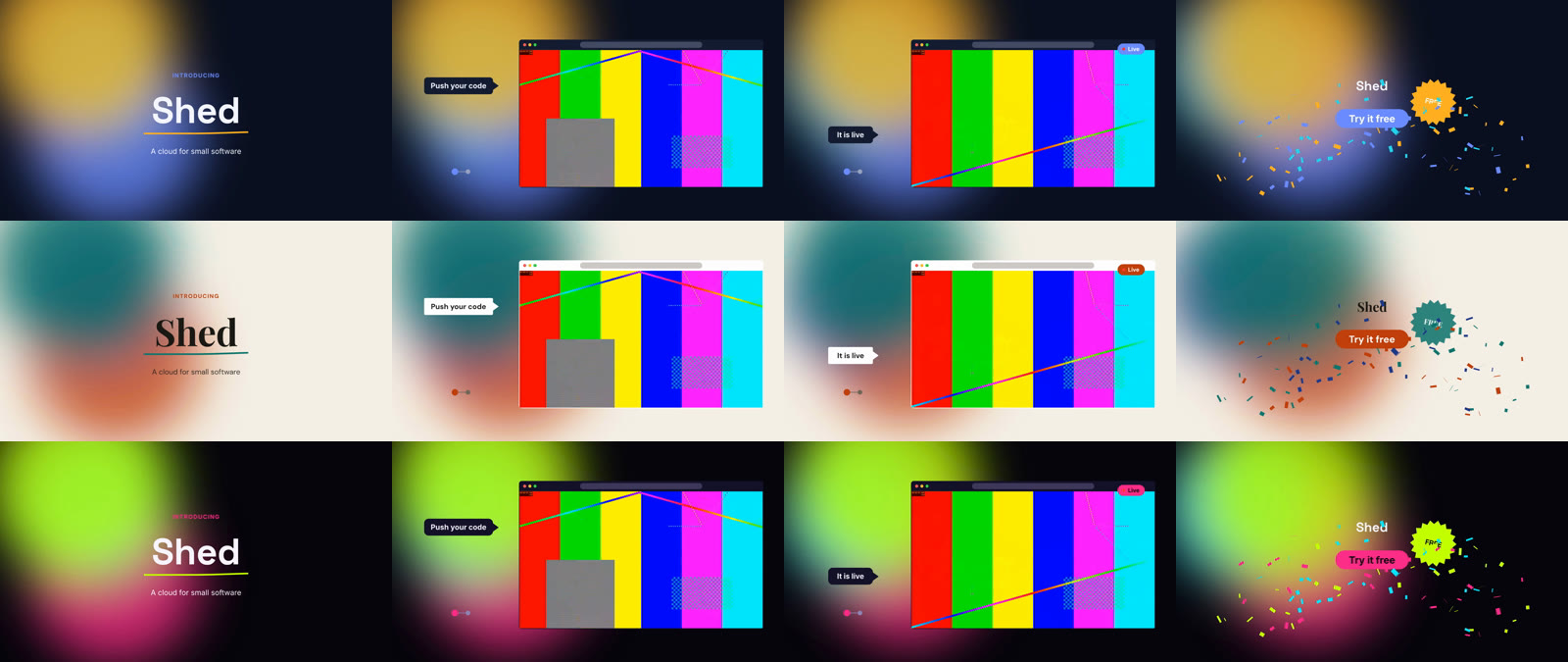
A twelve-second spot drawn around one screen recording: an opening title over a soft backdrop, the product in a browser window with callouts, and a closing card with confetti. The look is one prop.
What the manifest gives it
Only the screen recording. Everything else is drawn: titles in the theme's presets, and free code (<Motion>, a <Layer> and a <Three> scene) in the theme's palette, fonts and radius.
What the file shows
- The composition's theme extends the built-in theme the
themeprop names: every colour, font, radius and entrance comes from it, so the same edit renders inmidnight,paperorneonwith no other change. - No literal colours or fonts: titles use presets (
kicker,h1,body,h2), and the drawn parts readTHEMES[theme](palette, fonts, radius). - The backdrop (three soft shapes drifting in a
<Motion>) sits on the lowest track, so it draws beneath the screen recording; the callouts, steps and the live pill sit on later tracks, above it. - The window is sized to the scaled recording and anchored to it, so moving the clip moves its frame.
The file
tsx
import { z } from "zod";

import { Clip, Composition, Layer, Motion, THEME_NAMES, THEMES, Three, Title, Track } from "@cutcraft/kit";

/**
 * A twelve-second spot drawn around one screen recording. The look is one prop: titles take the theme's presets, and
 * the drawn parts (backdrop, window, callouts, pills, confetti) take its palette, fonts and radius from `THEMES`, so
 * `theme` swaps it without touching the edit.
 *
 *   resolve(collectModule(file, { theme: "paper" }), manifest)
 */
export const schema = z.object({
  theme: z.enum(THEME_NAMES).describe("The look: one of the built-in themes"),
  product: z.string().describe("Product name"),
  tagline: z.string().describe("One line under the name"),
  cta: z.string().describe("Call to action on the closing card"),
});

export const defaults = {
  theme: "midnight",
  product: "Shed",
  tagline: "A cloud for small software",
  cta: "Try it free",
};

export default function Video({ theme, product, tagline, cta }: z.infer<typeof schema>) {
  const { palette, fonts, radius } = THEMES[theme];
  const bubble = {
    padding: "22px 34px",
    borderRadius: radius * 1.5,
    background: palette.surface,
    color: palette.text,
    font: `600 40px '${fonts.body}', sans-serif`,
    boxShadow: "0 18px 40px rgba(0, 0, 0, 0.35)",
    whiteSpace: "nowrap",
  } as const;
  const pill = {
    display: "flex",
    alignItems: "center",
    gap: 14,
    padding: "14px 30px",
    borderRadius: 999,
    background: palette.primary,
    color: palette.onPrimary,
    font: `700 36px '${fonts.heading}', sans-serif`,
    whiteSpace: "nowrap",
  } as const;
  /** Centred on (x, y). The wrapper holds the centring, since Motion's scale replaces the animated element's transform. */
  const at = (x: number, y: number) =>
    ({ position: "absolute", left: x, top: y, transform: "translate(-50%, -50%)" }) as const;
  const popIn: [string, Record<string, unknown>, Record<string, unknown>] = [
    ".in",
    { opacity: [0, 1], scale: [0.7, 1] },
    { duration: 0.35, ease: [0.2, 0.9, 0.2, 1] },
  ];

  return (
    <Composition fps={30} width={1920} height={1080} theme={{ extends: theme }}>
      {/* The bottom of the picture: three soft shapes in the palette drift for the whole spot. */}
      <Track id="backdrop" layout="free" name="Backdrop">
        <Motion
          id="blobs"
          start={0}
          duration={12}
          sequence={[
            [".a", { x: [0, 160, 0], y: [0, 90, 0] }, { duration: 12, ease: "easeInOut" }],
            [".b", { x: [0, -140, 0], y: [0, -70, 0] }, { at: 0, duration: 12, ease: "easeInOut" }],
            [".c", { scale: [1, 1.25, 1] }, { at: 0, duration: 12, ease: "easeInOut" }],
          ]}
        >
          <div style={{ position: "absolute", inset: 0, background: palette.background }} />
          {(
            [
              ["a", palette.primary, 260, 160, 760],
              ["b", palette.secondary, 1240, 520, 820],
              ["c", palette.accent, 760, 760, 560],
            ] as const
          ).map(([name, color, left, top, size]) => (
            <div
              key={name}
              className={name}
              style={{
                position: "absolute",
                left,
                top,
                width: size,
                height: size,
                borderRadius: "50%",
                background: color,
                opacity: 0.28,
                filter: "blur(120px)",
              }}
            />
          ))}
        </Motion>
      </Track>

      <Track id="screen" layout="free" name="Screen">
        <Clip
          id="demo"
          src="asset:screen"
          in={2}
          out={8}
          start={4}
          fit="contain"
          transform={{ scale: 0.62, position: { x: 260, y: 40 } }}
        />
        {/* A browser window around the scaled recording (1190 x 670) with a 51 px title bar, anchored to it. */}
        <Layer id="window" anchor="demo" duration={6}>
          <div
            style={{
              position: "absolute",
              left: 622,
              top: 194,
              width: 1196,
              height: 724,
              borderRadius: radius,
              border: `3px solid ${palette.surface}`,
              boxShadow: "0 30px 80px rgba(0, 0, 0, 0.45)",
            }}
          >
            <div
              style={{
                height: 51,
                background: palette.surface,
                borderRadius: `${radius}px ${radius}px 0 0`,
                display: "flex",
                alignItems: "center",
                gap: 12,
                paddingLeft: 22,
              }}
            >
              {[palette.primary, palette.accent, palette.secondary].map((color) => (
                <div key={color} style={{ width: 16, height: 16, borderRadius: 8, background: color }} />
              ))}
            </div>
          </div>
        </Layer>
      </Track>

      <Track id="open" layout="free" name="Opening">
        <Title id="kicker" start={0.3} duration={3.5} style="kicker" transform={{ position: { x: 0, y: -170 } }}>
          INTRODUCING
        </Title>
        <Title id="name" start={0.5} duration={3.3} style="h1" size={180}>
          {product}
        </Title>
        {/* An underline that draws itself under the name. */}
        <Motion
          id="swoosh"
          start={1.1}
          duration={2.7}
          sequence={[["path", { pathLength: [0, 1] }, { duration: 0.7, ease: "easeOut" }]]}
        >
          <svg width="1920" height="1080" style={{ position: "absolute", inset: 0 }}>
            <title>Underline</title>
            <path
              d="M 700 662 Q 960 628 1220 650"
              stroke={palette.primary}
              strokeWidth={14}
              strokeLinecap="round"
              fill="none"
            />
          </svg>
        </Motion>
        <Title id="tagline" start={1.4} duration={2.4} style="body" transform={{ position: { x: 0, y: 200 } }}>
          {tagline}
        </Title>
      </Track>

      <Track id="notes" layout="free" name="Notes">
        <Motion id="step-1" anchor="demo" offset={0.6} duration={2.4} sequence={[popIn]}>
          <div style={at(340, 420)}>
            <div className="in" style={{ ...bubble }}>
              Push your code
            </div>
          </div>
        </Motion>
        <Motion id="step-2" anchor="demo" offset={3} duration={2.8} sequence={[popIn]}>
          <div style={at(340, 660)}>
            <div className="in" style={{ ...bubble }}>
              It is live
            </div>
          </div>
        </Motion>
        {/* Two steps: the first done, the second filling in when the app goes live. */}
        <Motion
          id="steps"
          anchor="demo"
          offset={0.6}
          duration={5.2}
          sequence={[
            [".dot", { opacity: [0, 1] }, { duration: 0.3 }],
            [".two", { backgroundColor: [palette.surface, palette.primary] }, { at: 2.4, duration: 0.3 }],
          ]}
        >
          <div className="dot" style={{ position: "absolute", left: 300, top: 826, display: "flex", gap: 24 }}>
            <div style={{ width: 28, height: 28, borderRadius: 14, background: palette.primary }} />
            <div className="two" style={{ width: 28, height: 28, borderRadius: 14, background: palette.surface }} />
          </div>
        </Motion>
        <Motion
          id="live"
          anchor="demo"
          offset={3.2}
          duration={2.6}
          sequence={[popIn, [".blink", { opacity: [1, 0.2, 1, 0.2, 1] }, { at: 0.4, duration: 2 }]]}
        >
          <div style={at(1700, 240)}>
            <div className="in" style={{ ...pill }}>
              <div className="blink" style={{ width: 18, height: 18, borderRadius: 9, background: palette.accent }} />
              Live
            </div>
          </div>
        </Motion>
      </Track>

      <Track id="close" layout="free" name="Closing">
        <Title id="end-name" start={10} duration={2} style="h2" transform={{ position: { x: 0, y: -120 } }}>
          {product}
        </Title>
        <Motion id="end-cta" start={10.3} duration={1.7} sequence={[popIn]}>
          <div style={at(960, 580)}>
            <div className="in" style={{ ...pill, fontSize: 48 }}>
              {cta}
            </div>
          </div>
        </Motion>
        <Motion
          id="end-badge"
          start={10.6}
          duration={1.4}
          sequence={[
            [".in", { opacity: [0, 1], scale: [0, 1], rotate: [-40, 12] }, { duration: 0.4, ease: "backOut" }],
          ]}
        >
          <svg
            className="in"
            width="200"
            height="200"
            viewBox="-100 -100 200 200"
            style={{ position: "absolute", left: 1210, top: 330 }}
          >
            <title>Free</title>
            <polygon
              points={Array.from({ length: 24 }, (_, i) => {
                const r = i % 2 === 0 ? 96 : 76;
                const a = (i / 24) * Math.PI * 2;
                return `${(Math.cos(a) * r).toFixed(1)},${(Math.sin(a) * r).toFixed(1)}`;
              }).join(" ")}
              fill={palette.accent}
            />
            <text
              textAnchor="middle"
              dominantBaseline="central"
              fill={palette.background}
              style={{ font: `800 40px '${fonts.heading}', sans-serif` }}
            >
              FREE
            </text>
          </svg>
        </Motion>
        {/* Confetti: seeded pieces that burst up and fall, a function of time like everything else. */}
        <Three
          id="party"
          start={10.3}
          duration={1.7}
          camera={{ position: [0, 0, 10], fov: 50 }}
          setup={({ scene, THREE }) => {
            let seed = 11;
            const random = () => {
              seed = (seed * 16807) % 2147483647;
              return seed / 2147483647;
            };
            const colors = [palette.primary, palette.secondary, palette.accent];
            const pieces = Array.from({ length: 160 }, (_, i) => {
              const mesh = new THREE.Mesh(
                new THREE.PlaneGeometry(0.22, 0.12),
                new THREE.MeshBasicMaterial({ color: colors[i % 3], side: THREE.DoubleSide }),
              );
              scene.add(mesh);
              return { mesh, vx: (random() - 0.5) * 9, vy: 5 + random() * 6, spin: (random() - 0.5) * 14 };
            });
            return ({ time }) => {
              for (const p of pieces) {
                p.mesh.position.set(p.vx * time, -1 + p.vy * time - 4.9 * time * time, 0);
                p.mesh.rotation.set(p.spin * time, p.spin * time * 0.7, 0);
              }
            };
          }}
        />
      </Track>
    </Composition>
  );
}
What the editor can do
- Swap the theme from the tweaks panel (it folds into
defaults), or change one value withtheme/setTokenonce the theme is a literal. - Drag the clip: the window, the callouts and the steps follow their anchor.
What to check
- No lint warnings expected.
- Render it in three themes and look at a few frames of each:
sh
for t in midnight paper neon; do
  cutcraft recipes/brand-spot.tsx --manifest recipes/manifest.json --media <dir> --props "{\"theme\":\"$t\"}" --out spot-$t.mp4
done
Midnight, paper and neon at 2, 5.5, 8 and 11.2 seconds: